NoBsDL Video Downloader userscript
A free, open-source userscript that puts a Download button on video pages. Pick a real quality with its file size, as MP4 video or MP3 audio, and the file goes straight to your browser's downloads: no new tab, no copied links, no third-party converter sites. Version 2.6.0, MIT licensed.
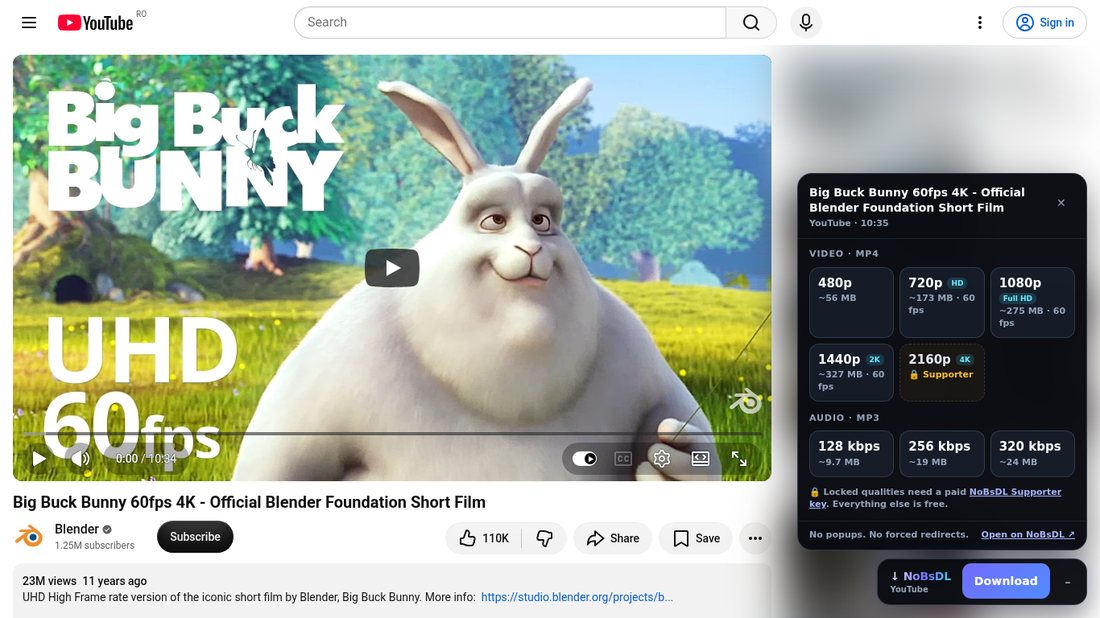
What it does
- A Download button on every video. With a mouse, pointing at a video or thumbnail (YouTube player, home, search and sidebar; X, Reddit, Instagram, Facebook, Bluesky, 9GAG feeds; TikTok, Twitch and Bilibili) shows a button that opens that exact clip.
- Real qualities, real sizes. Every choice comes from the actual source (for example 720p60 · ~173 MB, or MP3 320 kbps), listed by NoBsDL. Nothing is invented.
- Live progress. Queue → Download → Process → Ready, with a real percentage, speed and time left measured on the server.
- In your language. The panel follows your browser: English, Chinese, Russian, Ukrainian, Spanish, Portuguese, French, German, Italian, Polish, Turkish, Indonesian, Vietnamese, Japanese and Korean.
- MP4 and MP3. Video qualities next to MP3 at 128, 256 and 320 kbps.
- Works while you scroll. On TikTok's For You feed, X timelines and Bluesky the button takes the clip on screen, without opening each video first.
- Made for phones too. A round button you can drag anywhere and a bottom sheet with big touch targets.
- Stays out of the way. Close the panel mid-download and it keeps going; the button shows the percentage.
Supported sites
Each link opens that site's downloader on nobsdl.com, which also works without the script.
- YouTube downloader
- YouTube to MP3
- YouTube Shorts downloader
- YouTube playlist downloader
- TikTok downloader
- Instagram downloader
- Facebook video downloader
- Reddit video downloader
- X (Twitter) video downloader
- SoundCloud to MP3
Twitch clips and videos, Bilibili, Dailymotion, Pinterest, Bluesky, Streamable, Imgur, 9GAG, Odysee, Rutube, OK.ru, and Bandcamp and Mixcloud as MP3 work through the universal video downloader.
Guides
- How to download a video from a link
- YouTube video quality explained
- What 320 kbps MP3 actually means
- How to download a YouTube playlist
- A downloader without popups or fake buttons
- Download a video from a link on iPhone
- Download a video from a link on Android
- Video link not downloading? Causes and fixes
Install
- Install Tampermonkey or Violentmonkey.
- Open the script on Greasy Fork and press Install. Updates arrive automatically.
Privacy
The script talks only to nobsdl.com, and only after you click. It contains no analytics, ads or tracking code, and stores only whether you minimized the button, where you dragged it, whether the buttons on videos are on, and a count of saved files for a one-time rating note. The code is readable and unminified.